Spring is almost here, and I am excited to announce some new projects that I have been working on. I have been busy creating the very first marketable prize vending machine, which will be released soon. This custom-built vending machine is unlike anything you have ever seen before, and I can’t wait for everyone to experience it.
In addition to the new vending machine, I am also teaching a class at Mayland Community College – Avery campus about smart home introduction using Home Assistant. This class is designed to help you get started with Home Assistant, a powerful open-source home automation platform. With Home Assistant, you can control all your smart home devices from a single interface, making it easy to manage and automate your home.
But that’s not all! I am also planning a summer Introduction to Laser Cutting class at Mayland Community College – Mitchell campus. This class is perfect for anyone who is interested in learning about laser cutting and how it can be used to create beautiful and intricate designs on a wide range of materials. I will teach you everything you need to know to get started, including how to use the software and how to operate the laser cutter safely.
I am excited about all these new projects, and I hope you are too. As always, I are committed to providing high-quality, locally sourced products and services to our community. Stay tuned for more updates and details on our upcoming classes and events! Please register at Mayland for the upcoming classes if interested.
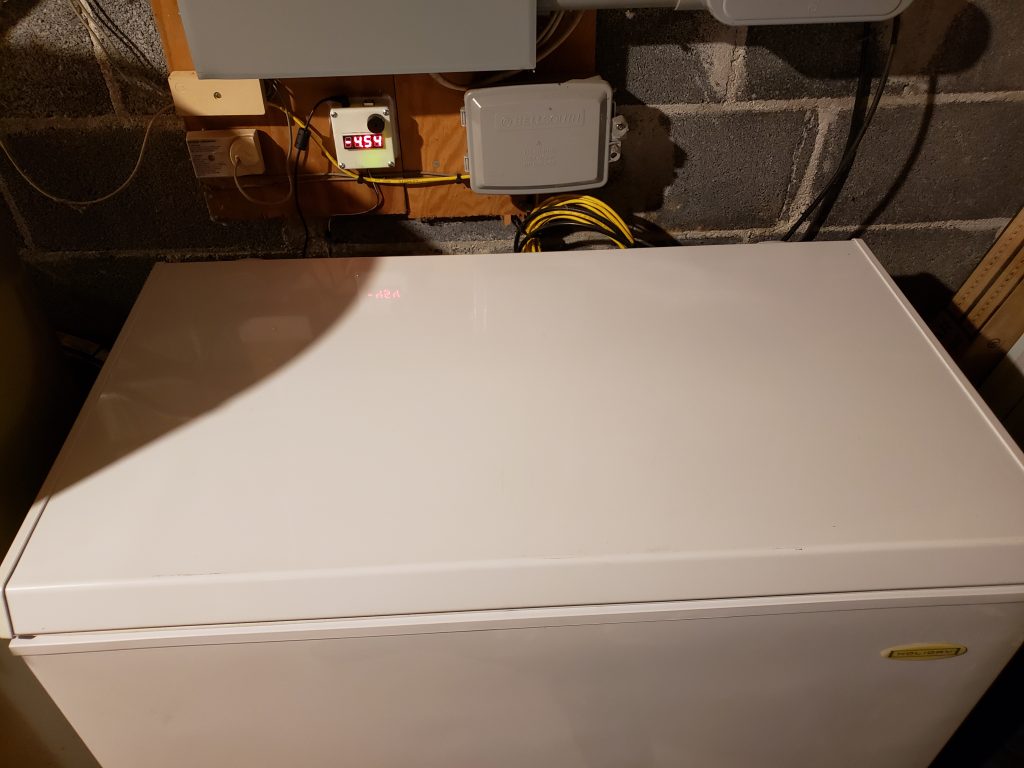
The other day I started thinking about our chest freezer and all of the hundreds of dollars worth of food that we have in there. What if it fails and goes unnoticed for a while? The freezer is getting older. Probably around 11 years old. I would hate for all of that food to ruin. Plus that’s a lot of money to loose if it does fail. So I started looking online for a simple freezer alarm thermometer.
What I found didn’t really stand out as something I would trust to do the job. Most of them were battery powered and the reviews had several complaints about how quiet the alarms were. Some even mentioned that the alarm would just stop after a few minutes. With our freezer being located in a basement I needed something reliable, loud, and that could just be plugged in. I definitely didn’t need yet another device that had to have batteries replaced every so often. So I just decided to build my own and post the results for anyone else in the same predicament.
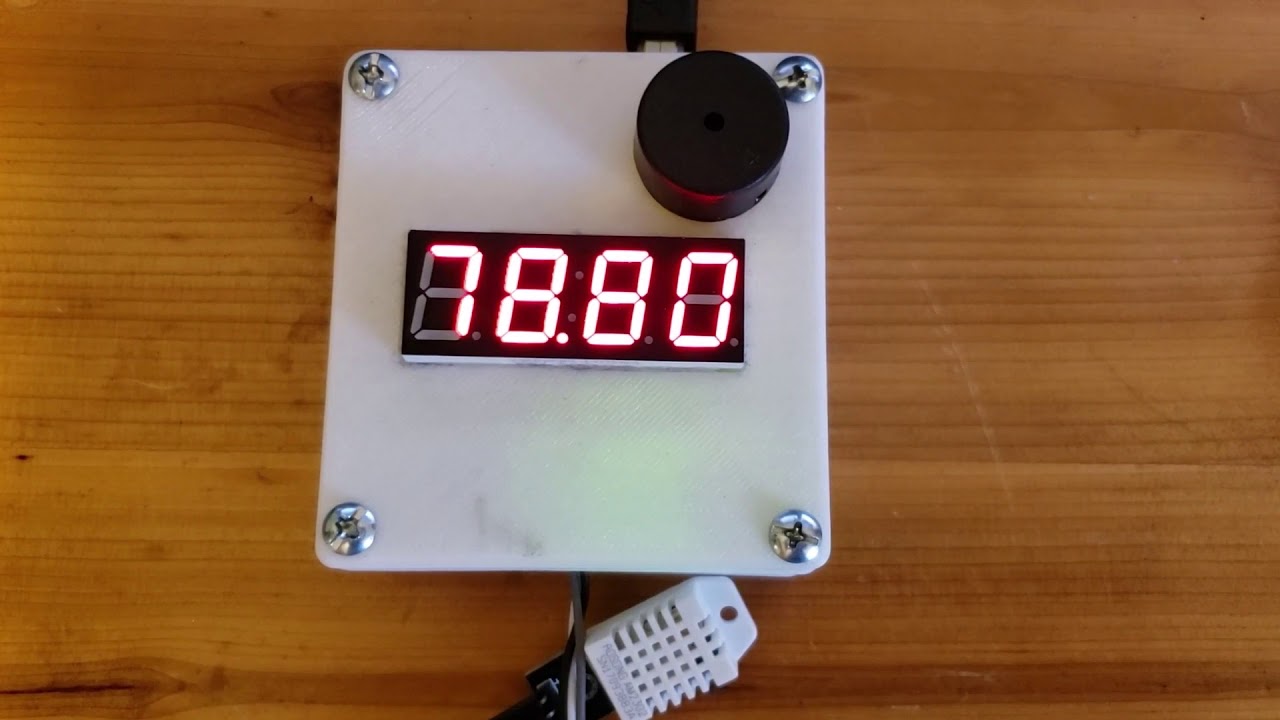
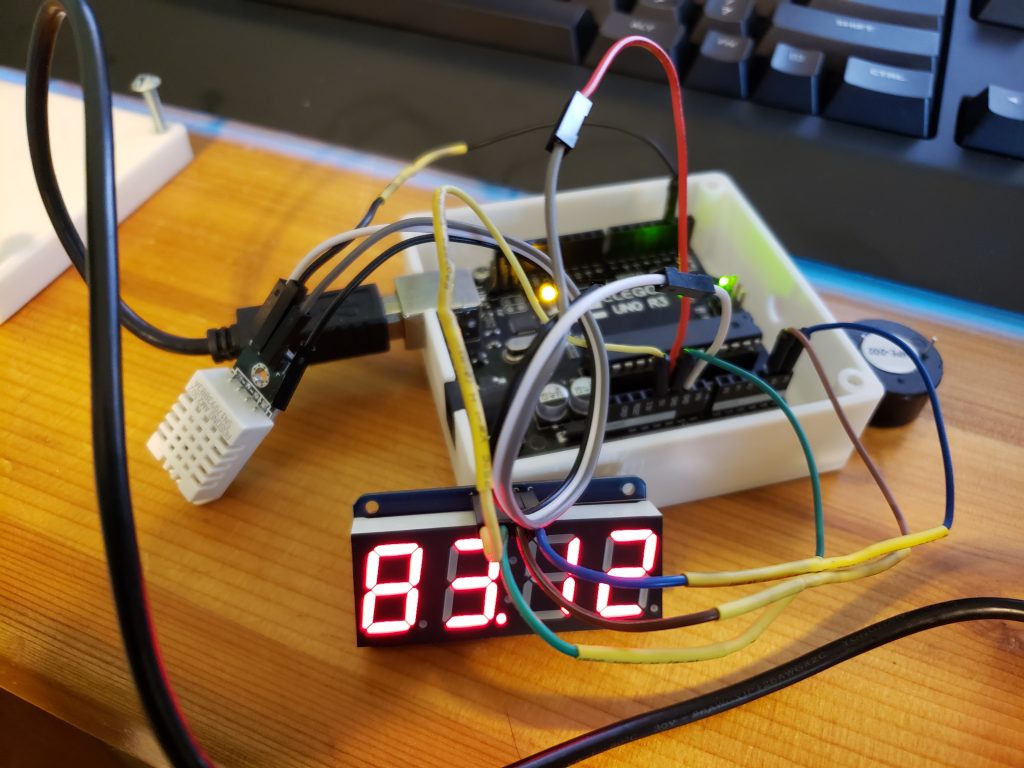
Below is everything you should need to build your own Arduino powered freezer alarm. It operates like this. The temperature sensor is placed in the freezer with small gauge wires in order not to cause issues with the seal. When the temperature inside the freezer gets to 32°F/0°C or above the alarm sounds for 3 seconds and repeats every 13 seconds until the temperature drops below freezing. If the Arduino looses signal from the temperature sensor it will sound the alarm constantly.
It’s a very simple setup that with a little research and minimal skills you can build yourself. I will include everything that I did to build this device here, but you can modify it however you want. I know that everyone doesn’t have a 3D printer to print their own case, but you can just buy a project box enclosure and get the same results.
Parts:
ELEGOO UNO R3
DHT22/AM2302 Digital Temperature and Humidity Sensor
4-Digit 7-Segment Display HT16K33 -Adafruit
100dB Piezoelectric Buzzer
24 Gauge Solid Wire
Solder/Heat-shrink Tubing
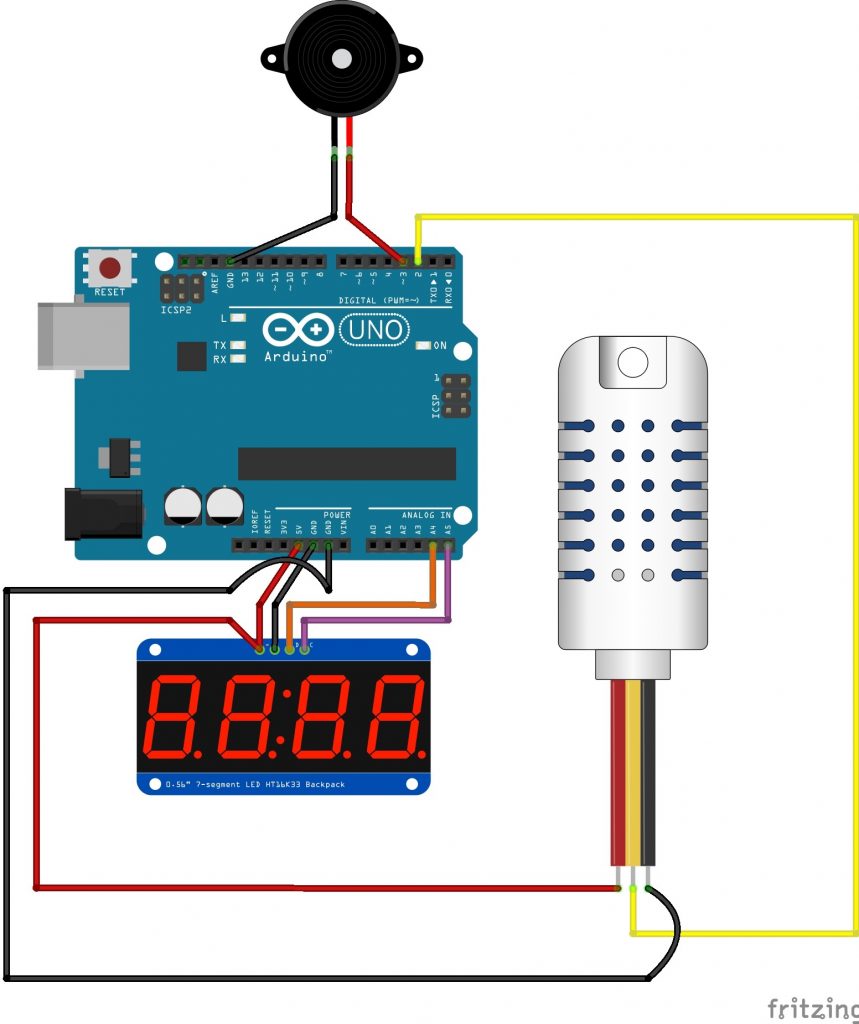
Wiring/Parts Layout
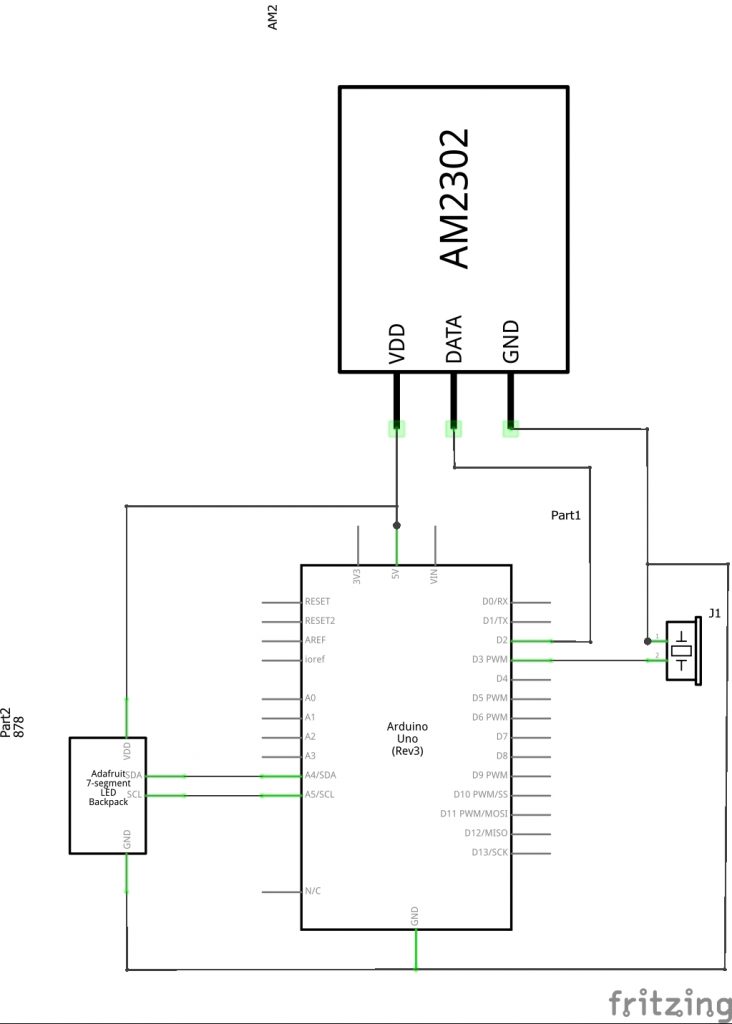
Schematic
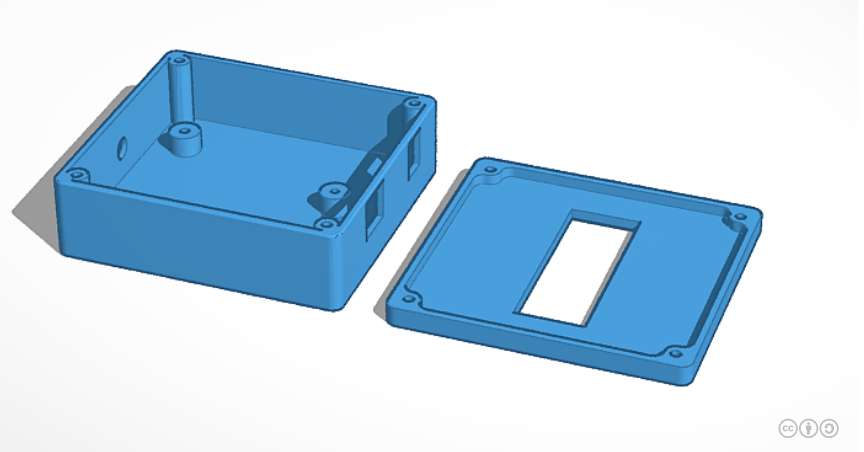
3D Printable Case
Arduino Sketch
//freezeralarm (low temperature freezer alarm)
//by Adam (aparker@appforgeworks.com)
//2020.05.4 https://www.appforgeworks.com
//version 1.1

#include "DHT.h" //DHT sensor library - adafruit
#include <Wire.h> //wire library
#include "Adafruit_LEDBackpack.h" //adafruit unified sensor library
#include "Adafruit_GFX.h" //adafruit GFX library

int speakerPin = 3;
int length = 1;

#define DHTPIN 2 //DHT22 is connected to digital pin 2
#define DHTTYPE DHT22   //set the type of sensor

DHT dht(DHTPIN, DHTTYPE);
Adafruit_7segment matrix = Adafruit_7segment();

void setup() {
    dht.begin();
    matrix.begin(0x70);
    matrix.setBrightness(1);

}

void loop() {
  pinMode(speakerPin, OUTPUT);
  delay(2000);

  float t = dht.readTemperature(); //t = DHT temp

    if (isnan(t)) { //failure to read from DHT sensor alarm
      digitalWrite(speakerPin, HIGH);
    return;
    }

    if (t >= 0) { //alarm for temp above or equal to 0 celsius 32 fahrenheit
      digitalWrite(speakerPin, HIGH);
      delay (3000); //wait 3 seconds
      digitalWrite(speakerPin, LOW);
    }

    matrix.print(t*1.8+32); //display temp in fahrenheit
    matrix.writeDisplay();
    delay(10000); //wait 10 seconds

}
We use cookies to improve your experience on our site. By using our site, you consent to cookies.
This website uses cookies
Websites store cookies to enhance functionality and personalise your experience. You can manage your preferences, but blocking some cookies may impact site performance and services.
Essential cookies enable basic functions and are necessary for the proper function of the website.
Name
Description
Duration
Cookie Preferences
This cookie is used to store the user's cookie consent preferences.
30 days
These cookies are needed for adding comments on this website.
Name
Description
Duration
comment_author
Used to track the user across multiple sessions.
Session
comment_author_email
Used to track the user across multiple sessions.
Session
comment_author_url
Used to track the user across multiple sessions.
Session
Google reCAPTCHA helps protect websites from spam and abuse by verifying user interactions through challenges.
Name
Description
Duration
_GRECAPTCHA
Google reCAPTCHA sets a necessary cookie (_GRECAPTCHA) when executed for the purpose of providing its risk analysis.
179 days
Statistics cookies collect information anonymously. This information helps us understand how visitors use our website.
Google Analytics is a powerful tool that tracks and analyzes website traffic for informed marketing decisions.
Contains information related to marketing campaigns of the user. These are shared with Google AdWords / Google Ads when the Google Ads and Google Analytics accounts are linked together.
90 days
__utma
ID used to identify users and sessions
2 years after last activity
__utmt
Used to monitor number of Google Analytics server requests
10 minutes
__utmb
Used to distinguish new sessions and visits. This cookie is set when the GA.js javascript library is loaded and there is no existing __utmb cookie. The cookie is updated every time data is sent to the Google Analytics server.
30 minutes after last activity
__utmc
Used only with old Urchin versions of Google Analytics and not with GA.js. Was used to distinguish between new sessions and visits at the end of a session.
End of session (browser)
__utmz
Contains information about the traffic source or campaign that directed user to the website. The cookie is set when the GA.js javascript is loaded and updated when data is sent to the Google Anaytics server
6 months after last activity
__utmv
Contains custom information set by the web developer via the _setCustomVar method in Google Analytics. This cookie is updated every time new data is sent to the Google Analytics server.
2 years after last activity
__utmx
Used to determine whether a user is included in an A / B or Multivariate test.
18 months
_ga
ID used to identify users
2 years
_gali
Used by Google Analytics to determine which links on a page are being clicked
30 seconds
_ga_
ID used to identify users
2 years
_gid
ID used to identify users for 24 hours after last activity
24 hours
_gat
Used to monitor number of Google Analytics server requests when using Google Tag Manager
1 minute
SourceBuster is used by WooCommerce for order attribution based on user source.
Name
Description
Duration
sbjs_session
The number of page views in this session and the current page path
30 minutes
sbjs_udata
Information about the visitor’s user agent, such as IP, the browser, and the device type
session
sbjs_first
Traffic origin information for the visitor’s first visit to your store (only applicable if the visitor returns before the session expires)
session
sbjs_current
Traffic origin information for the visitor’s current visit to your store
session
sbjs_first_add
Timestamp, referring URL, and entry page for your visitor’s first visit to your store (only applicable if the visitor returns before the session expires)
session
sbjs_current_add
Timestamp, referring URL, and entry page for your visitor’s current visit to your store
session
sbjs_migrations
Technical data to help with migrations between different versions of the tracking feature
session
Marketing cookies are used to follow visitors to websites. The intention is to show ads that are relevant and engaging to the individual user.
Google Maps is a web mapping service providing satellite imagery, real-time navigation, and location-based information.